本篇目录
说明
taos 是 2019 年下半年在朋友圈刷屏的项目,国内公司开发的专注于时间序列的存储,官宣的性能报告十分感人。
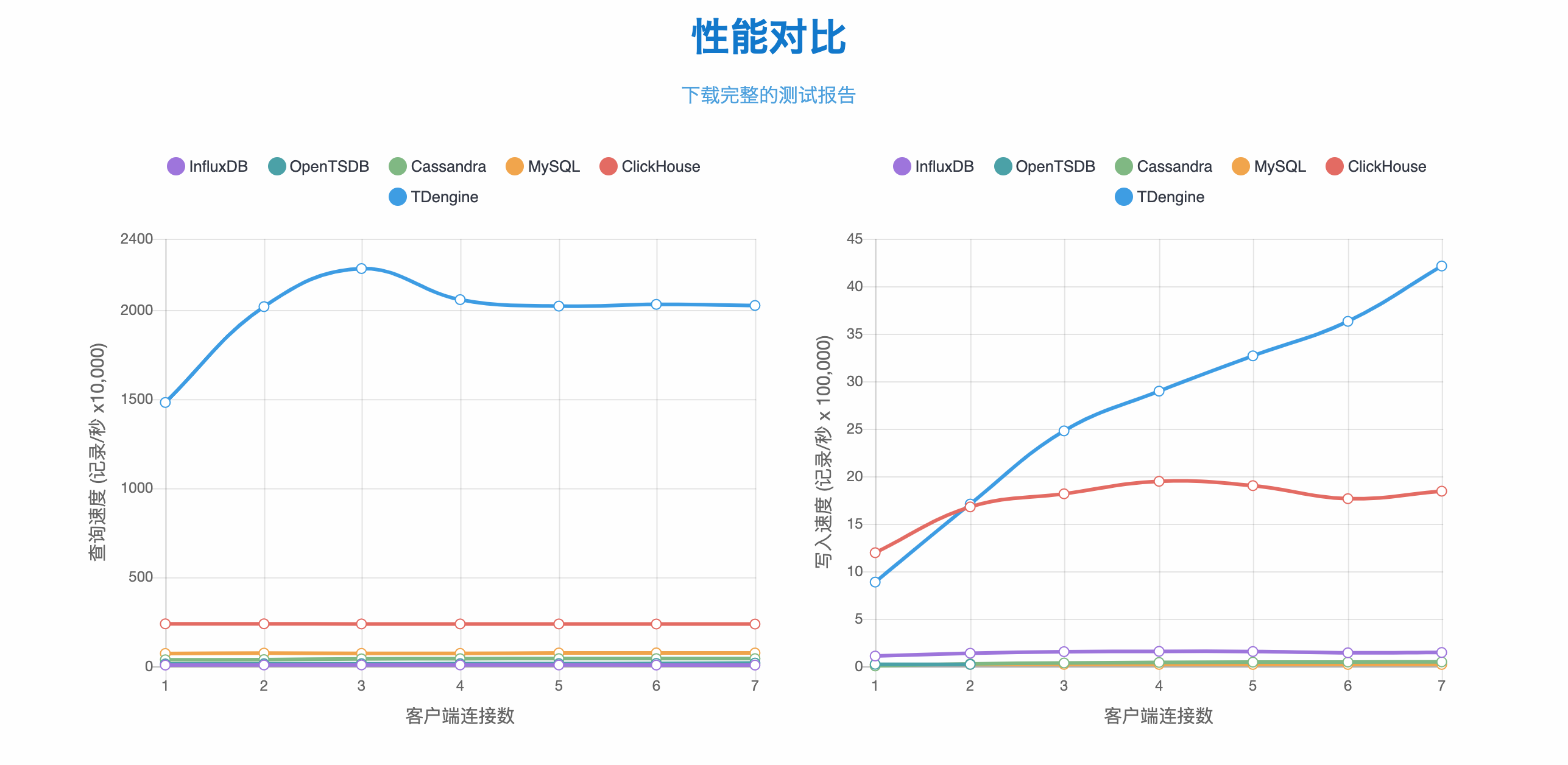
用InfluxDB开源的性能测试工具对比InfluxDB和TDengine
安装
$ yum install TDengine-server-1.6.5.5-Linux-x64.rpm
配置文件:
/etc/taos/taos.cfg
启动:
$ systemctl start taosd
使用
操作 taos:
$ taos

Welcome to the TDengine shell from linux, community client version:1.6.5.5 community server version:1.6.5.5
Copyright (c) 2017 by TAOS Data, Inc. All rights reserved.

taos>
如果遇到下面的问题,在 /etc/taos/taos.cfg 中设置 local 和 charset:
Welcome to the TDengine shell from linux, community client version:1.6.5.5 02/12 01:28:31.055738 4303 7f1de0216740 ERROR UTL can't get locale from system
Invalid locale:, please set the valid locale in config file
failed to get charset, please set the valid charset in config file
# system locale
locale                en_US.UTF-8
# default system charset
charset               UTF-8
写入查询:
create database db;
use db;
create table t (ts timestamp, speed int);
insert into t values ('2019-07-15 00:00:00', 10);
insert into t values ('2019-07-15 01:00:00', 20);
select * from t;
          ts          |   speed   |
===================================
 19-07-15 00:00:00.000|         10|
 19-07-15 01:00:00.000|         20|
Query OK, 2 row(s) in set (0.001700s)
更详细的说明文档:TDengine文档。
注意事项
- 每个采集点使用独立的表,每个采集点的数据存放位置连续;
- 如果一个采集点有多组不同频率的采样,对应建立多张表;
- 落盘时间默认一小时一次,缓存数据达到一定数量时落盘;
- 数据默认保存时间 3650 天;
- 通过超级表管理大量相同格式的子表(每个采集点对应的表);
- 标签在超级表中定义,最多 6 个;
- 创建子表时选定超级表,并给出标签值;
- 只对时间建立索引;
- 可以在写数据时自动建立子表;