本篇目录
说明
nginx 公司在 Testing the Performance of NGINX and NGINX Plus Web Servers 介绍了 nginx 的性能,他们使用的性能评估方法和压测方式,很值得学习。
压测工具见:怎样压测 Web 应用的性能?压测工具与测量、分析方法
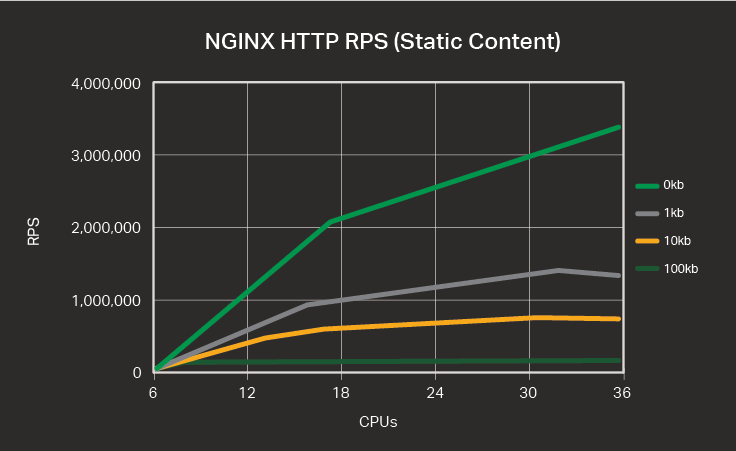
请求处理速率 RPS
nginx 每秒处理的 http 请求数,长连接场景。
测试方法,每个 wrk 进程绑定一个核,维持 50 个长连接,总计 36 个核:
for i in `seq 1 number-of-CPUs`; do
    taskset -c $i wrk -t 1 -c 50 -d 180s http://Reverse-Proxy-Server-IP-address/1kb.bin &
done
变量:
- cpu 数量(nginx worker 数量)
- 响应数据量 0 KB、1 KB、10 KB、100 KB
- http vs https
连接建立速率 CPS
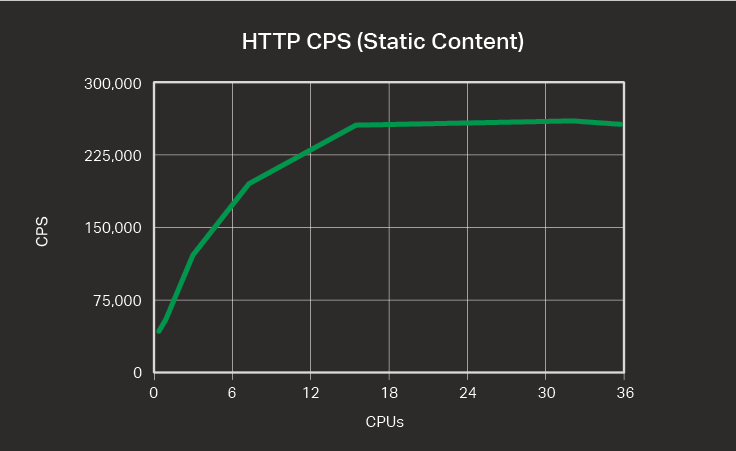
nginx 每秒建立的连接数,评估 nginx 新建连接的能力,用短连接评估。
测试方法,每个 wrk 进程绑定一个核,短连接,总计 36 个核,请求 0kb 文件:
for i in `seq 1 number-of-CPUs`; do
    taskset -c $i wrk -t 1 -c 50 -d 180s -H 'Connection: close' https://Reverse-Proxy-Server-IP-address/0kb.bin &
done
变量:
- cpu 数量(nginx worker 数量)
- http vs https
带宽 Throughput
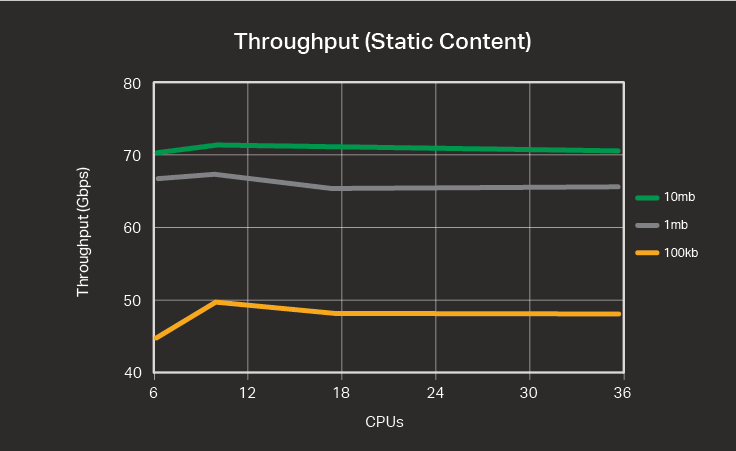
nginx 每秒钟返回的数据量。
测试方法,每个 wrk 进程绑定一个核,50 个长连接,总计 36 个核:
for i in `seq 1 number-of-CPUs`; do
    taskset -c $i wrk -t 1 -c 50 -d 180s http://Reverse-Proxy-Server-IP-address/1mb.bin &
done
变量:
- cpu 数量(nginx worker 数量)
- http vs https
多网卡测试
nginx 服务器可能有多个网卡,可以用下面的方法测试,同时压测两个网卡的地址:
for i in `seq 1 number-of-CPUs/2`; do
    n=`echo $(($i+number-of-CPUs/2))`;
    taskset -c $i ./wrk -t 1 -c 50 -d 180s http://Reverse-Proxy-Server-IP-address-1/1kb.bin &
    taskset -c $n ./wrk -t 1 -c 50 -d 180s http://Reverse-Proxy-Server-IP-address-2/1kb.bin &
done
官方结论
nginx 机器最高给予 24 核就可以了:
- 1~16 核时,增加 cpu 会提高 RPS,16~32 核提升效果减弱,32 核以上基本没有提升(http 和 https 都适用)
- 1~16 核时,增加 cpu 会线性提高 CPS,16 核以上基本没有提升(https 可到 24 核)
- 1~8 核时,增加 cpu 会提高吞吐,8 核以上基本没有提升
https 的开销非常大:
启用 https 后:

单核 rps 从 14.5551 万降低到 7.1561 (请求 0 kb 数据)
单核 rps 从  3.3125 万降低到 0.4830 (请求 100 kb 数据)
单核 cps 从  3.4344 万降低到 428(没错,是百位数,https 建连开销非常大)
nginx plus 的能力见:Sizing Guide for Deploying NGINX Plus on Bare Metal Servers。
官方测试环境
客户端/服务端的硬件规格:
CPU: 2x Intel(R) Xeon(R) CPU E5‑2699 v3 @ 2.30 GHz, 36 real (or 72 HT) cores
Network: 2x Intel XL710 40 GbE QSFP+ (rev 01)
Memory: 16 GB
https 加密参数:
ECDHE-RSA-AES256-GCM-SHA384 cipher
2,048‑bit RSA key
Perfect forward secrecy (as indicated by ECDHE in the cipher name)
OpenSSL 1.0.1f
软件版本:
客户端:  wrk 4.0.0
服务端:  nginx 1.9.7
操作系统:ubuntu 14.04.1